Create GIF from UIImages
Create GIF images from UIImages using CGImageDestination in CoreGraphics
iOS has built in APIs to read and create most common media types, including GIFs and this post covers from the basics of GIF frame timing and metadata, variable frame rates, and flexible output options.
Prerequisites
- Xcode 12 or newer
- iOS 13+ deployment target (iOS 14+ for modern
UniformTypeIdentifiersAPI) - A non-empty array of
UIImageinstances ImageIOframework (included by default in iOS projects)
Understanding the Core Concepts
Before diving into code, it's helpful to understand how GIF encoding works in iOS:
- CGImageDestination: The low-level API from ImageIO that writes image data to files or memory
- Type Identifiers: Tell the system what file format you're creating (GIF in this case)
- Frame Properties: Metadata for each frame, including timing and loop behavior
- Variable Frame Durations: Each frame can have its own display duration for complex animations
From Frames to an Animated GIF
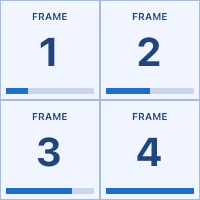
Here are ten 100 × 100-pixel images in order, with 12 pixels between them. Each image shows its frame number and a progress bar along the bottom edge.
Frames

Frames → GIF

The GIF plays those same images in sequence, showing each for 0.5 seconds before advancing. It repeats after five seconds. The usage examples below generate these frames and encode the animation.
1. Normalize Frames (Optional but Recommended)
While not strictly required, normalizing your frames ensures consistent sizing and color space, which prevents visual artifacts in the final GIF. This is especially important when combining frames from different sources.
import UIKit

func normalizeFrames(from images: [UIImage], targetSize: CGSize) -> [UIImage] {
    let renderer = UIGraphicsImageRenderer(size: targetSize)
    return images.map({ image in
        renderer.image(actions: { _ in
            // Fill background (important for transparent images)
            UIColor.white.setFill()
            UIRectFill(CGRect(origin: .zero, size: targetSize))

            // Draw the image centered and aspect-fitted
            let imageRect = CGRect(origin: .zero, size: targetSize)
            image.draw(in: imageRect)
        })
    })
}
2. Choose Your Type Identifier API
iOS provides two ways to specify the GIF file type. Choose based on your deployment target.
Modern Approach (iOS 14+): UniformTypeIdentifiers
import UniformTypeIdentifiers

let typeIdentifier = UTType.gif.identifier as CFString
Legacy Approach (iOS 13+): MobileCoreServices
import MobileCoreServices

let typeIdentifier = kUTTypeGIF
For maximum compatibility, you can use conditional compilation:
#if canImport(UniformTypeIdentifiers)
import UniformTypeIdentifiers
let gifType = UTType.gif.identifier as CFString
#else
import MobileCoreServices
let gifType = kUTTypeGIF
#endif
3. Configure GIF Metadata with Variable Frame Durations
GIFs support different timing for each frame, which is perfect for animations with varying speeds (like holding on certain frames longer).
import ImageIO

// Global GIF properties (loop count, etc.)
func gifProperties(loopCount: Int = 0) -> CFDictionary {
    return [
        kCGImagePropertyGIFDictionary: [
            kCGImagePropertyGIFLoopCount: loopCount // 0 = loop forever
        ]
    ] as CFDictionary
}

// Per-frame properties (timing)
func frameProperties(duration: TimeInterval) -> CFDictionary {
    // Clamp to minimum 0.02 (50 fps max) to prevent zero-delay frames
    let clampedDuration = max(duration, 0.02)
    return [
        kCGImagePropertyGIFDictionary: [
            kCGImagePropertyGIFDelayTime: clampedDuration,
            kCGImagePropertyGIFUnclampedDelayTime: clampedDuration
        ]
    ] as CFDictionary
}
Note: Both GIFDelayTime and GIFUnclampedDelayTime are set to ensure consistent timing across different browsers and viewers.
4. Export to File URL
Writing directly to a file URL is the most memory-efficient approach for large animations.
import ImageIO
#if canImport(UniformTypeIdentifiers)
import UniformTypeIdentifiers
#else
import MobileCoreServices
#endif

func exportGIFToFile(
    frames: [UIImage],
    frameDurations: [TimeInterval],
    outputURL: URL,
    loopCount: Int = 0
) throws {
    guard !frames.isEmpty else {
        throw GIFEncodingError.emptyFrames
    }

    // Determine type identifier
    #if canImport(UniformTypeIdentifiers)
    let gifType = UTType.gif.identifier as CFString
    #else
    let gifType = kUTTypeGIF
    #endif

    // Create destination
    guard let destination = CGImageDestinationCreateWithURL(
        outputURL as CFURL,
        gifType,
        frames.count,
        nil
    ) else {
        throw GIFEncodingError.cannotCreateDestination
    }

    // Set global properties
    CGImageDestinationSetProperties(destination, gifProperties(loopCount: loopCount))

    // Add each frame with its duration
    for (index, frame) in frames.enumerated() {
        guard let cgImage = frame.cgImage else {
            throw GIFEncodingError.missingCGImage
        }

        let duration = index < frameDurations.count ? frameDurations[index] : 0.1
        CGImageDestinationAddImage(destination, cgImage, frameProperties(duration: duration))
    }

    // Finalize
    guard CGImageDestinationFinalize(destination) else {
        throw GIFEncodingError.finalizeFailed
    }
}
5. Export to In-Memory Data
For situations where you need the GIF as a Data object (like uploading to a server or sharing via network), create the GIF in memory using NSMutableData.
func exportGIFToData(
    frames: [UIImage],
    frameDurations: [TimeInterval],
    loopCount: Int = 0
) throws -> Data {
    guard !frames.isEmpty else {
        throw GIFEncodingError.emptyFrames
    }

    let gifData = NSMutableData()

    // Determine type identifier
    #if canImport(UniformTypeIdentifiers)
    let gifType = UTType.gif.identifier as CFString
    #else
    let gifType = kUTTypeGIF
    #endif

    // Create destination
    guard let destination = CGImageDestinationCreateWithData(
        gifData,
        gifType,
        frames.count,
        nil
    ) else {
        throw GIFEncodingError.cannotCreateDestination
    }

    // Set global properties
    CGImageDestinationSetProperties(destination, gifProperties(loopCount: loopCount))

    // Add each frame with its duration
    for (index, frame) in frames.enumerated() {
        guard let cgImage = frame.cgImage else {
            throw GIFEncodingError.missingCGImage
        }

        let duration = index < frameDurations.count ? frameDurations[index] : 0.1
        CGImageDestinationAddImage(destination, cgImage, frameProperties(duration: duration))
    }

    // Finalize
    guard CGImageDestinationFinalize(destination) else {
        throw GIFEncodingError.finalizeFailed
    }

    return gifData as Data
}
Reusable GIFEncoder
Here's a complete, reusable encoder that combines all the above techniques with comprehensive error handling and flexible options.
import UIKit
import ImageIO
#if canImport(UniformTypeIdentifiers)
import UniformTypeIdentifiers
#else
import MobileCoreServices
#endif

/// Errors that can occur during GIF encoding
enum GIFEncodingError: Error {
    case emptyFrames
    case missingCGImage
    case cannotCreateDestination
    case finalizeFailed
    case writeFailed(Error)

    var localizedDescription: String {
        switch self {
        case .emptyFrames:
            return "Cannot create GIF from empty frame array"
        case .missingCGImage:
            return "One or more UIImage frames lack a CGImage representation"
        case .cannotCreateDestination:
            return "Failed to create CGImageDestination"
        case .finalizeFailed:
            return "Failed to finalize GIF encoding"
        case .writeFailed(let error):
            return "Failed to write GIF data: \(error.localizedDescription)"
        }
    }
}

/// Configuration for GIF encoding
struct GIFEncoderConfiguration {
    /// Frame durations in seconds. If nil, uses defaultFrameDuration for all frames
    let frameDurations: [TimeInterval]?

    /// Default duration for frames when frameDurations is nil or shorter than frames array
    let defaultFrameDuration: TimeInterval

    /// Number of times to loop (0 = infinite)
    let loopCount: Int

    /// Whether to normalize frames to a consistent size
    let normalizeFrames: Bool

    /// Target size for normalization (only used if normalizeFrames is true)
    let targetSize: CGSize?

    init(
        frameDurations: [TimeInterval]? = nil,
        defaultFrameDuration: TimeInterval = 0.1,
        loopCount: Int = 0,
        normalizeFrames: Bool = false,
        targetSize: CGSize? = nil
    ) {
        self.frameDurations = frameDurations
        self.defaultFrameDuration = defaultFrameDuration
        self.loopCount = loopCount
        self.normalizeFrames = normalizeFrames
        self.targetSize = targetSize
    }
}

/// Encodes an array of UIImage frames into an animated GIF
struct GIFEncoder {

    // MARK: - Public Methods

    /// Export GIF to a file URL
    static func exportToFile(
        frames: [UIImage],
        fileURL: URL,
        configuration: GIFEncoderConfiguration = GIFEncoderConfiguration()
    ) throws {
        let processedFrames = prepareFrames(frames, configuration: configuration)

        guard let destination = createDestination(
            url: fileURL,
            frameCount: processedFrames.count
        ) else {
            throw GIFEncodingError.cannotCreateDestination
        }

        try encodeFrames(
            processedFrames,
            to: destination,
            configuration: configuration
        )
    }

    /// Export GIF to in-memory Data
    static func exportToData(
        frames: [UIImage],
        configuration: GIFEncoderConfiguration = GIFEncoderConfiguration()
    ) throws -> Data {
        let processedFrames = prepareFrames(frames, configuration: configuration)
        let data = NSMutableData()

        guard let destination = createDestination(
            data: data,
            frameCount: processedFrames.count
        ) else {
            throw GIFEncodingError.cannotCreateDestination
        }

        try encodeFrames(
            processedFrames,
            to: destination,
            configuration: configuration
        )

        return data as Data
    }

    // MARK: - Private Helpers

    private static func prepareFrames(
        _ frames: [UIImage],
        configuration: GIFEncoderConfiguration
    ) -> [UIImage] {
        guard configuration.normalizeFrames else {
            return frames
        }

        let size = configuration.targetSize ?? frames.first?.size ?? CGSize(width: 300, height: 300)
        return normalizeFrames(frames, targetSize: size)
    }

    private static func normalizeFrames(
        _ frames: [UIImage],
        targetSize: CGSize
    ) -> [UIImage] {
        let renderer = UIGraphicsImageRenderer(size: targetSize)
        return frames.map({ image in
            renderer.image(actions: { _ in
                UIColor.white.setFill()
                UIRectFill(CGRect(origin: .zero, size: targetSize))
                image.draw(in: CGRect(origin: .zero, size: targetSize))
            })
        })
    }

    private static func createDestination(
        url: URL,
        frameCount: Int
    ) -> CGImageDestination? {
        #if canImport(UniformTypeIdentifiers)
        let gifType = UTType.gif.identifier as CFString
        #else
        let gifType = kUTTypeGIF
        #endif

        return CGImageDestinationCreateWithURL(
            url as CFURL,
            gifType,
            frameCount,
            nil
        )
    }

    private static func createDestination(
        data: NSMutableData,
        frameCount: Int
    ) -> CGImageDestination? {
        #if canImport(UniformTypeIdentifiers)
        let gifType = UTType.gif.identifier as CFString
        #else
        let gifType = kUTTypeGIF
        #endif

        return CGImageDestinationCreateWithData(
            data,
            gifType,
            frameCount,
            nil
        )
    }

    private static func encodeFrames(
        _ frames: [UIImage],
        to destination: CGImageDestination,
        configuration: GIFEncoderConfiguration
    ) throws {
        guard !frames.isEmpty else {
            throw GIFEncodingError.emptyFrames
        }

        // Set global GIF properties
        let gifProperties: CFDictionary = [
            kCGImagePropertyGIFDictionary: [
                kCGImagePropertyGIFLoopCount: configuration.loopCount
            ]
        ] as CFDictionary
        CGImageDestinationSetProperties(destination, gifProperties)

        // Add each frame
        for (index, frame) in frames.enumerated() {
            guard let cgImage = frame.cgImage else {
                throw GIFEncodingError.missingCGImage
            }

            let duration = frameDuration(
                at: index,
                configuration: configuration
            )

            let frameProperties = makeFrameProperties(duration: duration)
            CGImageDestinationAddImage(destination, cgImage, frameProperties)
        }

        // Finalize
        guard CGImageDestinationFinalize(destination) else {
            throw GIFEncodingError.finalizeFailed
        }
    }

    private static func frameDuration(
        at index: Int,
        configuration: GIFEncoderConfiguration
    ) -> TimeInterval {
        if let durations = configuration.frameDurations,
           index < durations.count {
            return durations[index]
        }
        return configuration.defaultFrameDuration
    }

    private static func makeFrameProperties(duration: TimeInterval) -> CFDictionary {
        let clampedDuration = max(duration, 0.02) // Min 50 fps
        return [
            kCGImagePropertyGIFDictionary: [
                kCGImagePropertyGIFDelayTime: clampedDuration,
                kCGImagePropertyGIFUnclampedDelayTime: clampedDuration
            ]
        ] as CFDictionary
    }

}
Usage Examples
These examples create their own numbered frames. Set the renderer’s scale to 1 so a 100 × 100-point drawing produces exactly 100 × 100 pixels, including on a Retina device.
func makeExampleFrames(count: Int) -> [UIImage] {
    let size = CGSize(width: 100, height: 100)
    let format = UIGraphicsImageRendererFormat()
    format.scale = 1
    format.opaque = true
    let renderer = UIGraphicsImageRenderer(size: size, format: format)

    return (1...count).map({ frameNumber in
        renderer.image(actions: { _ in
            let bounds = CGRect(origin: .zero, size: size)
            UIColor(red: 0.94, green: 0.96, blue: 1, alpha: 1).setFill()
            UIRectFill(bounds)

            UIColor(red: 0.65, green: 0.73, blue: 0.86, alpha: 1).setStroke()
            UIBezierPath(rect: bounds.insetBy(dx: 0.5, dy: 0.5)).stroke()

            let paragraph = NSMutableParagraphStyle()
            paragraph.alignment = .center
            let ink = UIColor(red: 0.12, green: 0.27, blue: 0.48, alpha: 1)

            ("FRAME" as NSString).draw(
                in: CGRect(x: 0, y: 10, width: 100, height: 14),
                withAttributes: [
                    .font: UIFont.systemFont(ofSize: 10, weight: .semibold),
                    .foregroundColor: ink,
                    .paragraphStyle: paragraph
                ]
            )
            (String(frameNumber) as NSString).draw(
                in: CGRect(x: 0, y: 27, width: 100, height: 52),
                withAttributes: [
                    .font: UIFont.monospacedDigitSystemFont(ofSize: 40, weight: .bold),
                    .foregroundColor: ink,
                    .paragraphStyle: paragraph
                ]
            )

            let track = CGRect(x: 6, y: 88, width: 88, height: 6)
            UIColor(red: 0.79, green: 0.84, blue: 0.92, alpha: 1).setFill()
            UIRectFill(track)

            let progress = CGFloat(frameNumber) / CGFloat(count)
            let fill = CGRect(
                x: track.minX, y: track.minY,
                width: track.width * progress, height: track.height
            )
            UIColor(red: 0.12, green: 0.43, blue: 0.78, alpha: 1).setFill()
            UIRectFill(fill)
        })
    })
}
Basic Export with Uniform Frame Rate
let frames = makeExampleFrames(count: 10)
let outputURL = FileManager.default.temporaryDirectory
    .appendingPathComponent("animation.gif")

try GIFEncoder.exportToFile(
    frames: frames,
    fileURL: outputURL,
    configuration: GIFEncoderConfiguration(
        defaultFrameDuration: 0.5
    )
)

print("GIF saved to:", outputURL.path)
All ten frames use the same 0.5-second delay, giving a two-frame-per-second animation with a five-second loop.
Encoded GIF
Variable Frame Durations
Use four frames and hold frame 1 for 1.5 seconds, three times as long as each of the remaining frames at 0.5 seconds. The complete loop takes three seconds.
let frames = makeExampleFrames(count: 4)
let durations: [TimeInterval] = [1.5, 0.5, 0.5, 0.5]
let outputURL = FileManager.default.temporaryDirectory
    .appendingPathComponent("variable-durations.gif")

try GIFEncoder.exportToFile(
    frames: frames,
    fileURL: outputURL,
    configuration: GIFEncoderConfiguration(
        frameDurations: durations,
        loopCount: 0 // Infinite loop
    )
)
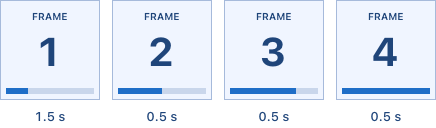
Encoded GIF
The progress bar shows the frame’s position in the sequence. The pause on frame 1 comes from its GIF delay metadata, so the encoder needs only four frames.
Export to Data for Network Upload
let frames = [/* your frames */]

let gifData = try GIFEncoder.exportToData(
    frames: frames,
    configuration: GIFEncoderConfiguration(
        defaultFrameDuration: 0.1,
        normalizeFrames: true,
        targetSize: CGSize(width: 480, height: 480)
    )
)

// Upload to server
let url = URL(string: "https://api.example.com/upload")!
var request = URLRequest(url: url)
request.httpMethod = "POST"
request.httpBody = gifData
request.setValue("image/gif", forHTTPHeaderField: "Content-Type")

URLSession.shared.dataTask(
    with: request,
    completionHandler: { data, response, error in
        // Handle response
    }
).resume()
Normalize Frames from Different Sources
// Combine frames from different sources with different sizes
let photoFrame = UIImage(named: "photo")! // 1920x1080
let iconFrame = UIImage(named: "icon")!   // 128x128
let frames = [photoFrame, iconFrame]

try GIFEncoder.exportToFile(
    frames: frames,
    fileURL: outputURL,
    configuration: GIFEncoderConfiguration(
        defaultFrameDuration: 0.5,
        normalizeFrames: true,
        targetSize: CGSize(width: 512, height: 512)
    )
)
Best Practices and Tips
Frame Count and File Size: GIFs can grow large quickly. For a 480x480 GIF at 10 fps for 5 seconds, expect 1-3 MB depending on color complexity. Consider:
- Reducing frame size (320x320 or smaller for web)
- Lowering frame rate (8-12 fps is often sufficient)
- Using fewer unique frames
Frame Duration Sweet Spots:
- 0.1s (10 fps): Smooth enough for most animations, smaller file sizes
- 0.08s (12.5 fps): Good balance for action sequences
- 0.04s (25 fps): Very smooth, approaching video quality
- Avoid durations below 0.02s (50 fps) - many viewers won't respect them
Memory Considerations: For animations with 100+ frames, consider processing in batches or using the file URL approach instead of in-memory data to avoid memory pressure.
Color Space: GIFs are limited to 256 colors per frame. Photos and gradients may show banding. Line art, illustrations, and UI elements encode best.
Transparent Backgrounds: If your source images have transparency, set an appropriate background color during normalization (white, black, or transparent depending on your needs).
Conclusion
You now have a reusable solution for creating animated GIFs from UIImage sequences in iOS.
The GIFEncoder struct handles the complexity of ImageIO's API while providing flexibility for both simple and advanced use cases, while giving you full control over timing, output format, and quality trade-offs.
For a more advanced exporter consider adding:
- Quantization control: Fine-tune the color palette reduction
- Dithering options: Add dithering to reduce banding in photos
- Progress callbacks: Report encoding progress for long operations
- Background encoding: Move the encoding off the main thread for better UX